0 ratings


Número do item:
69355953
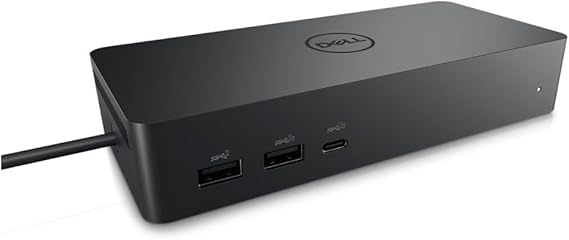
Dell DELL-UD22 UD22 Universal Dock, Black
90% of respondents would recommend this to a friend
Número do item:
69355953
R$ 1454
Detalhes do preço
Excluindo custos de envio e alfandegários ( Os custos de envio e alfandegários serão calculados no checkout )
*Todos os itens serão importados de EUA
0 ratings
Escreva uma avaliação
Em estoque
 Importado de loja dos USA
Qtd.:
Peça agora e receba por volta de Quarta, Setembro 09
Transação Segura
A Ubuy trabalha para proteger sua segurança e privacidade. Nosso sistema avançado de segurança de pagamentos garante a confidencialidade ao criptografar suas informações durante a transmissão usando os protocolos AES (Advanced Encryption Standards) e SSL (Secure Socket Layer). Seus dados de pagamento estão 100% seguros, pois não compartilhamos suas informações com vendedores terceiros.
Nossos principais parceiros logísticos


Create a productive workstation with increased flexibility

Envio
rápido

Devolução
gratuita*

Embalagem segura

Produtos 100% originais

Conformidade com PCI DSS

Certificado ISO 27001

















Destaques do Produto
Versatile Connectivity
The Dell Universal Dock UD22 supports multiple device connections, offering HDMI, USB-C, and Ethernet ports, enabling seamless integration with various laptops and peripherals for enhanced productivity.
High-Resolution Support
This dock provides dual 4K display capabilities, ensuring high-resolution performance for graphic-intensive tasks, ideal for professional users seeking superior visual experiences without compromising on speed.
Compact Design
The sleek and compact form factor of the UD22 ensures efficient desk space usage, appealing to users in home offices or collaborative workspaces who value aesthetics alongside functionality.
Detalhes do produto
| Hardware Interface | HDMI, USB 3.0 Type A |
| Compatible Devices | Monitors |
| Total Usb Ports | 6 |
| Number of Ports | 10 |
| Total Number of HDMI Ports | 1 |
| Wattage | 130 |
| Item Dimensions L x W x H | 6.54"L x 1.26"W x 2.99"H (16.6 x 3.2 x 7.6 cm) |
| Item Weight | 14.7 ounces (416.75 grams) |
| Color | Black |
| Brand | Dell |
| Number of Items | 1 |
| Number of Packs | 1 |
| Unit Count | 1 Count |
| UPC | 884116431442 |
| Manufacturer | Dell Computers |
| Built-In Media | Item |
| Model Number | Dell-UD22 |
| Mfr Part Number | 210-BEXR |
| Total USB Ports | 6 |
| Product Dimensions (L x W x H) | 6.54"L x 1.26"W x 2.99"H (16.6 x 3.2 x 7.6 cm) |
| Total HDMI Ports | 1 |
Para quem é indicado?

-
Remote Workers
Ideal for remote workers needing multiple connections for monitors and peripherals, enhancing productivity and workspace organization.
-
Gamers
Great for gamers who require multiple display options and peripheral connectivity for an immersive gaming experience.
-
Content Creators
Perfect for content creators who need to connect various devices and displays for multitasking during editing and production.

-
Minimalists
Not suitable for users who prefer a minimal setup, as it adds multiple connections and devices to their workspace.
DESCRIÇÃO DO PRODUTO
Dell DELL-UD22 UD22 Universal Dock, Black
Tem alguma dúvida? Fale conosco pelo chat
Pesquisas Relacionadas
Perguntas e respostas do cliente
-
Pergunta:
What devices are compatible with the Dell Universal Dock UD22?
Resposta: The Dell Universal Dock UD22 is compatible with a wide range of devices including Dell laptops, as well as other brands supporting USB-C and Thunderbolt 3 connections. It is particularly beneficial for users with ultrabooks and 2-in-1 devices. This dock provides multiple ports, including HDMI, DisplayPort, and USB-A, which makes it a versatile accessory for both home and office setups, allowing for a seamless connection to external monitors, peripherals, and network systems. -
Pergunta:
How do I set up the Dell Universal Dock UD22?
Resposta: Setting up the Dell Universal Dock UD22 is straightforward and requires just a few simple steps. Start by connecting the dock to a power source, then connect your laptop using a USB-C or Thunderbolt 3 cable. Afterward, plug in your monitors and peripherals to the appropriate ports on the dock. The dock usually auto-configures itself, making it easy to extend your display or connect additional devices without any complicated setup. This is especially helpful for multitasking professionals who need a stable and efficient workspace. -
Pergunta:
Can I use multiple monitors with the Dell Universal Dock UD22?
Resposta: Yes, the Dell Universal Dock UD22 supports multiple monitor setups. Thanks to its array of video outputs, you can connect two external displays simultaneously via HDMI and DisplayPort. This is ideal for users who require enhanced productivity and wish to work on multiple applications side by side. For instance, graphic designers or data analysts can benefit significantly from expanded screen real estate, allowing for easier access to tools and documents. -
Pergunta:
Does the Dell Universal Dock UD22 provide power delivery to laptops?
Resposta: Absolutely, the Dell Universal Dock UD22 offers power delivery capabilities, enabling it to charge your connected laptop while in use. This feature eliminates the need for multiple chargers and helps keep your workspace tidy. Users with high-performance laptops will find this particularly advantageous as it allows for uninterrupted usage, especially during intensive tasks like video editing or gaming. You can stay productive without worrying about battery life. -
Pergunta:
Is the Dell Universal Dock UD22 suitable for gaming?
Resposta: While the Dell Universal Dock UD22 is primarily designed for office and productivity use, it can also be used for gaming, particularly with laptops that support gaming graphics. Users can connect their devices to a monitor for improved graphics display and performance. However, keep in mind that performance might vary based on your laptop's hardware capabilities; it works best when paired with devices that have robust processing power and high-refresh-rate monitors. -
Pergunta:
What type of cables are included with the Dell Universal Dock UD22?
Resposta: The Dell Universal Dock UD22 generally comes with a power adapter and a USB-C cable. These components are essential for connecting the dock to your laptop and powering it properly. Depending on the package, you may also need to use additional cables for connecting your monitors or peripherals. Users often find that having extra HDMI or DisplayPort cables on hand can enhance their connectivity options, ensuring they can set up their workspace as they prefer. -
Pergunta:
How does the Dell Universal Dock UD22 enhance my productivity?
Resposta: The Dell Universal Dock UD22 significantly enhances productivity by allowing multiple connections simultaneously, transforming your laptop into a comprehensive workstation. With its various ports for displays, USB devices, and networking, you can work with multiple screens and tools. For instance, professionals who deal with large spreadsheets or design software can efficiently manage their work environment, thereby streamlining workflows and minimizing time wasted on switching between applications. -
Pergunta:
Can I use the Dell Universal Dock UD22 with an older laptop model?
Resposta: Yes, the Dell Universal Dock UD22 can be used with older laptops, provided they have compatible ports, such as USB-C or Thunderbolt 3 connections. If your older laptop does not support these ports, alternative methods like USB-A adapters can sometimes facilitate connection, though functionality may be limited compared to newer models. This adaptability makes the dock a versatile choice for users transitioning from older to newer laptops or those with mixed tech environments. -
Pergunta:
What are the dimensions of the Dell Universal Dock UD22?
Resposta: The Dell Universal Dock UD22 typically has compact dimensions that make it easy to fit into any workspace without clutter. It is designed to occupy minimal desk space while providing extensive connectivity options. This is particularly important for users who may have limited desk space or need to frequently rearrange their work environment. With its sleek design, it complements both home offices and formal office settings seamlessly. -
Pergunta:
Where can I buy Dell Universal Dock UD22 Black in Brazil?
Resposta: You can purchase the Dell Universal Dock UD22 Black from Ubuy, a reliable online retailer that offers a wide selection of electronic products. Ubuy frequently provides detailed product descriptions and user reviews, making it easier for you to make an informed purchasing decision. Plus, with various shipping options, Ubuy ensures that you can conveniently obtain your ideal tech accessories from the comfort of your home.
Dell Docking Stations Dell-UD22 Editorial Review
The Dell Universal Dock UD22 is designed to enhance the connectivity of modern laptops, which frequently offer limited port options. Users have praised its substantial range of connectivity options, including HDMI, USB-A, USB-C, and RJ-45 ports, as well as its powerful performance capability, delivering up to 96W via USB-C to keep laptops charged. Many customers have noted the ease of setup and the durable quality of Dell's connectors. Reviews indicate that the dock successfully supports multiple monitors, with users reporting satisfactory experiences on both Windows and Mac systems. However, Mac users have identified occasional recognition issues with external displays, which may be attributed to the MacOS rather than the dock itself. Despite its strengths, some users have experienced technical difficulties, including inConsistent mouse connectivity and speaker switching problems, which often necessitated a restart of the dock. While many customers initially found the UD22 performance satisfactory, prolonged use has led to frustrations regarding these reliability issues. Despite these concerns, the dock remains highly recommended for its versatility and quality, particularly for those needing a Consistent and powerful docking solution in a professional or personal setting. **
Comentários e avaliações dos clientes
1 Avaliações dos clientes
-
5 Estrela
100%
-
4 Estrela
0%
-
3 Estrela
0%
-
2 Estrela
0%
-
1 Estrela
0%
Avalie este produto
Compartilhe sua opinião com outros clientes
Prós
- Versatile connectivity options (HDMI, USB-A, USB-C, RJ-45)
- Powerful performance with 96W power delivery
- Easy setup and durable build quality
- Works well with multiple monitors on Windows and Mac
Contras
- Some users report inConsistent mouse and speaker connectivity
CONFIANÇA NA PLATAFORMA E PROTEÇÃO AO COMPRADOR

MA
Mohammad
Comprador verificado
“Excellent quality and original too,when ubuy send original things I will appreciate that ,I very satisfied thank you”
23 July 2026 · via Trustpilot
CK
Chitra
Comprador verificado
“The order and delivery progress was communicated very well. Package arrived within the estimated time. Products arrived as expected in good condition.”
22-Jul-26 · via Trustpilot
K
kund
Comprador verificado
“Good supply of products. Safe payment methods, and shipment worldwide! Genuine products.”
23-Jul-26 · via Trustpilot
OO
Onesi
Comprador verificado
“Was my first time buying a product from Ubuy, but I found it so helpful. This is reliable. Gonna place a new order!”
22 July 2026 · via Trustpilot
SJ
SAO JOHN
Comprador verificado
“Ubuy is a great online platform to buy stuff. Reliable, fast delivery time and great value for money. I've been using Ubuy online shopping platform for three years now and will continue to do so.”
23 July 2026 · via Trustpilot
Finalize de forma segura
Entrega global
Devoluções Fáceis
Produtos originais
Top selling Dell Dock UD22 in Brasil




Last Updated on August 30, 2026
Histórico de preço do produto
Informações importantes
- Limitações: para envios internacionais de produtos, observe que qualquer garantia do fabricante pode não ser válida; as opções de serviço do fabricante podem não estar disponíveis; manuais, instruções e avisos de segurança do produto podem não estar no idioma do país de destino; os produtos (e os materiais que os acompanham) podem não ser projetados de acordo com os padrões, especificações e requisitos de rotulagem do país de destino; e os produtos podem não estar em conformidade com a voltagem do país de destino e outros padrões elétricos (exigindo o uso de um adaptador ou conversor, se apropriado). O destinatário é responsável por garantir que o produto possa ser importado legalmente para o país de destino. Ao fazer o pedido no Ubuy ou em suas afiliadas, o destinatário é o importador do registro e deve cumprir todas as leis e regulamentos do país de destino.
- Nem todos os produtos listados no Ubuy estão à venda, pois o Ubuy é um mecanismo de busca global. Os produtos estão sujeitos às regulamentações de exportação/comércio.
R$ 1454
Peça agora e receba por volta de Quarta, Setembro 09
Este item não é restrito no meu país. (Por favor clique no link acima se este item não for restrito em seu país para análise por parte da nossa equipe e permissão de envio).
Qtd.:
Transação Segura
Em conformidade com o PCI DSS e com certificação ISO 27001:2022, com pagamentos criptografados e proteção total ao comprador em todos os pedidos.
Nossos principais parceiros logísticos
Entrega internacional mais rápida
Características e benefícios
- Dell Universal Dock UD22 supports consistent display across systems
- It has the highest number of ports on a universal dock
Garantia Ubuy
Tenha uma experiência de compra tranquila e sem preocupações, com produtos 100% originais, segurança de pagamento em conformidade com o padrão PCI DSS, proteção de dados certificada pela ISO 27001, a entrega internacional mais rápida, devoluções gratuitas e embalagem segura em todos os pedidos.*